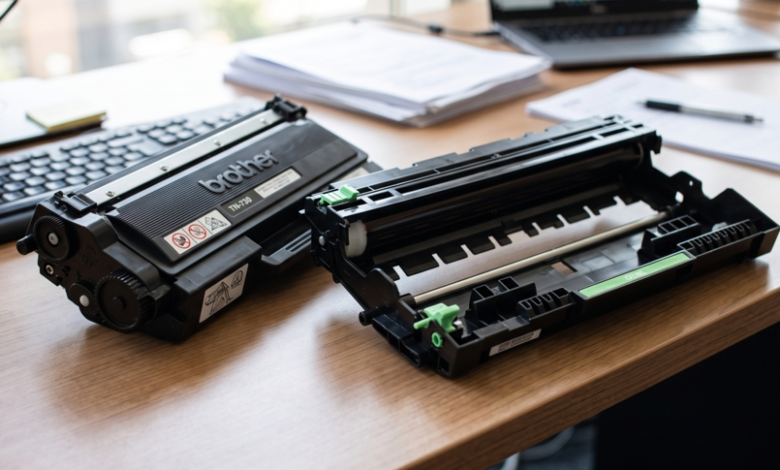
Your Brother printer shows a message, your prints look faded or streaky, and you head out to buy a replacement. Then comes the confusing part: should you buy a toner cartridge or a drum unit? Many people guess, and many guess wrong.
The two parts look similar and work side by side, but they do different jobs. Knowing the difference saves money and stops you buying something you don’t need. Whenever you do need a refill, choosing the right Brother toner cartridges for your exact model is the first step. Let’s make it simple.
What Is a Toner Cartridge?
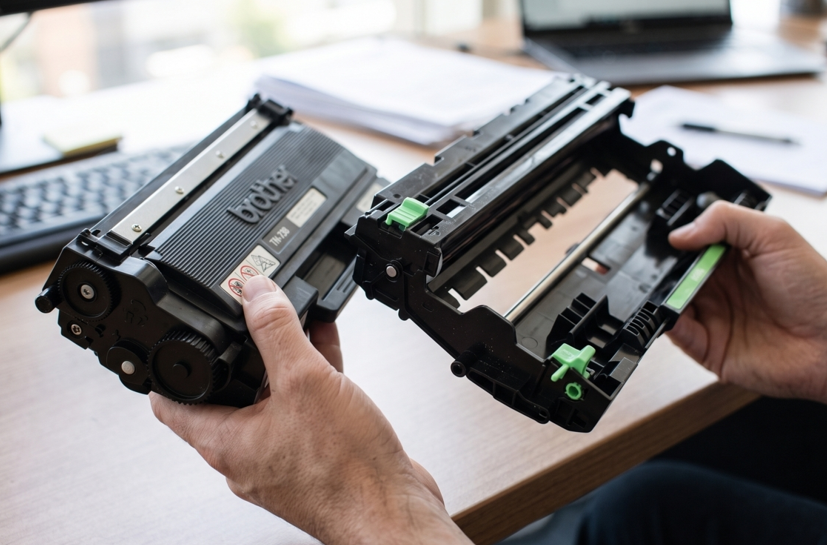
The toner cartridge holds the toner, the fine powder that forms the text and images on your page. When the powder runs out, your prints fade and eventually stop. A toner cartridge is a consumable part, so you replace it regularly.
What Is a Drum Unit?
The drum unit is a cylinder inside the printer that transfers the toner onto the paper. Think of it as a stamp: the toner is the ink, and the drum is what presses the image onto the page. A drum wears out slowly with use, so it lasts much longer than toner.
Toner vs Drum: Side by Side
Factor | Toner Cartridge | Drum Unit |
| Job | Supplies the toner powder | Transfers the image to paper |
| Lifespan | Shorter | Much longer |
| Replace how often | Frequently | Every few toner changes |
| Code on Brother parts | Starts with TN | Starts with DR |
| Typical sign of a problem | Faded or blank prints | Lines, marks or uneven prints |
How Do You Know Which One You Need?
The symptoms usually tell you.
You probably need new toner if:
- Text looks faded or washed out
- Pages come out blank or very light
- The printer says “Toner Low” or “Replace Toner”
You probably need a new drum if:
- Black lines or marks repeat down the page
- Prints are patchy, grey or uneven even with fresh toner
- The printer shows “Replace Drum” or “Drum End Soon”
A useful trick is to look at the pattern. If the same mark appears again and again at regular spacing, the drum is often the cause.
Do All Brother Printers Use a Separate Drum?
No. Many Brother laser printers use a separate toner and drum, while some models combine them in one cartridge. Check your manual or Brother’s support website for your exact model, so you buy the correct part. Use the full model name, such as HL-L2350DW, since similar models can differ.
Common Mistakes to Avoid
- Buying a drum when you only need toner
- Buying toner when the real problem is a worn drum
- Ordering by printer series instead of the full model name
- Touching the drum surface with your fingers
- Leaving the protective cover or tape on a new part
- Choosing the cheapest option without checking quality
How to Replace Each Part Safely
Replacing toner:
- Switch off the printer and open the front cover.
- Pull out the drum and toner assembly.
- Release and remove the old toner cartridge.
- Remove the tape from the new cartridge and click it into place.
Replacing the drum:
- Take out the old drum and toner assembly.
- Move the toner cartridge into the new drum unit.
- Slide the assembly back in and close the cover.
- Reset the drum counter if your model requires it. Check your manual for the steps.
Handle both parts by their handles, and keep the drum away from bright light.
Still Seeing Errors After Replacing Parts?
If you’ve fitted the right toner and a good drum and the printer still shows lines, faded prints or warnings, the cause may be deeper. A worn fuser, a faulty sensor or a failed roller can look just like a toner or drum problem. At this point a trusted Brother printer repair in Dubai service can test the machine, find the exact fault and save you from buying parts you don’t need.
Simple Habits to Make Both Parts Last
- Print a few pages every week so the printer doesn’t sit idle
- Use good-quality paper to reduce dust and wear
- Keep the printer in a clean, dry place
- Keep spare parts sealed in their packaging
- Order a replacement when the first warning appears
When Should You Get Extra Help?
Consider asking a technician for help if:
- Lines or marks stay after replacing both parts
- The printer rejects every part you try
- You hear grinding or clicking noises
- The printer shuts down or shows unclear errors
Opening a printer without training can damage delicate parts, so leave internal faults to a professional.

Final Thoughts
The toner holds the powder and the drum applies it to the page. Faded prints usually point to toner, repeating lines or marks usually point to the drum, and the TN and DR codes help you buy the right one. Check your full model name, buy from a supplier you trust, and get the printer checked if problems stay after replacing both parts.